Dev tools
At Penpot, you can inspect designs to get measures, view properties, export assets and get production-ready code.
Inspect design
You can activate the Inspect mode both at the View mode and at the Workspace.
At the View mode
Go to the Inspect designs at the View mode section to know how to activate inspect mode at the View mode.
At the Workspace
At the Workspace, select the Inspect tab at the right sidebar to enter inspect mode.
Inspect mode provides a safer view-only mode so developers can work at the Workspace without the fear of breaking things ;)
Get distances and measurements
You can easily get measurements and distances between a layer and other layers or board edges.
To get distances:
- Click on a layer or select it at the layers panel.
- Hover over other layers to see the distances between them and the selected one.
- Hover over a free space on the board or the area around it to see the distances from the layer to the board edges.
Get properties info
At the Info panel you can see specifications about style and content of a layer. Different types of layers can have different sets of properties.
Copy properties info
You can copy the value of one property or full sections of properties pressing the copy buttons that are shown at the right when hovering. For example you could copy all the layout properties or only the width.
Copy CSS properties from layers
To copy CSS properties from layers:
- Select one or more layers.
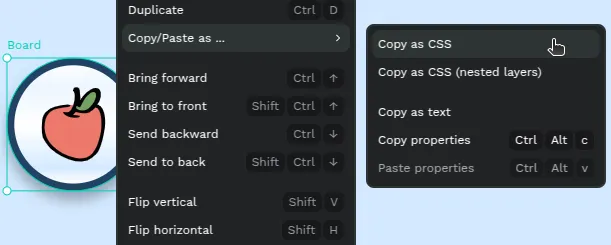
- Right click to show the layer menu.
- Press Copy/Paste as... > Copy as CSS in case you only want to get the CSS properties from the selected layer/s.
- Press Copy/Paste as... > Copy as CSS (nested layers) in case you only want to get the CSS properties from the selected layer/s and all the contained layers.
Get code
Press the code tab to get actual code snippets. Select a layer to get ready to use code for markup (SVG and HTML) and styles (currently CSS only but more are coming).
Export assets
Export option is available at the bottom of the Info panel. The same export presets that have been set at the workspace will be available at the View mode inspect. New export presets can be added at the Code mode but will not persist. Read more about exporting assets.